
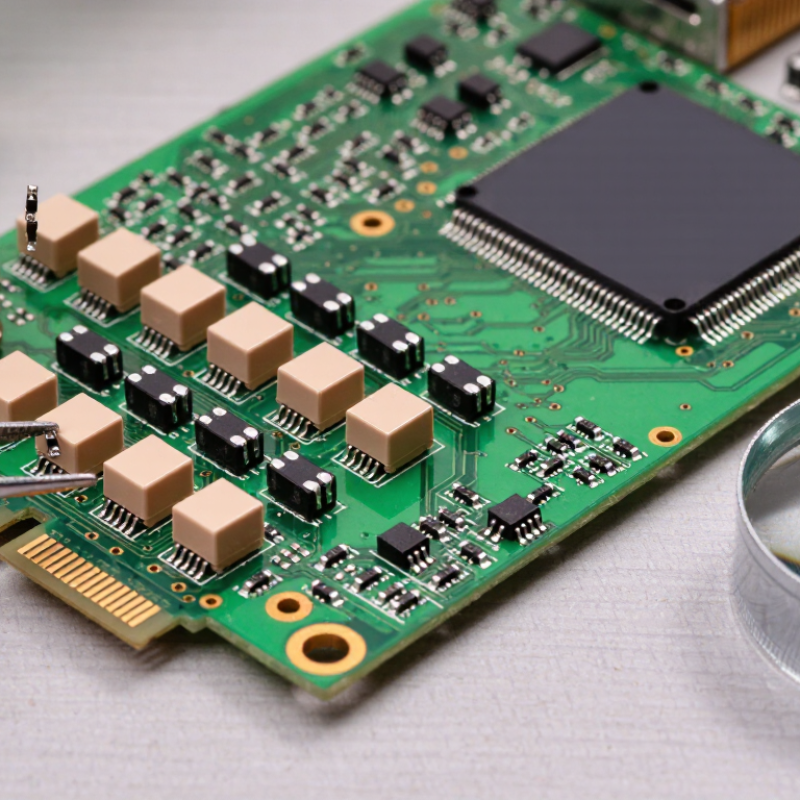
Identifying circuit board elements starts with careful observation, not guesswork. Look for printed labels such as R12, C4, D2, and U1. These designators often point to resistors, capacitors, diodes, and integrated circuits. Shape offers another clue. A tiny tan rectangle may be a surface-mount resistor or capacitor, while a black package with many pins is often an integrated circuit. Small clues matter. Labels help. Not always.
Experienced PCB designer Rick Hartley has emphasized, “If you don’t understand the return current path, you don’t understand the circuit.” That reminder connects each visible part to the board around it. A connector may carry power or signals; its nearby traces and components provide useful context. Check polarity marks on diodes and electrolytic capacitors, then compare component markings with the board’s silkscreen. A magnifier and good lighting can reveal faint codes, solder joints, and pin-one indicators. When markings are missing, consult the schematic or manufacturer’s datasheet rather than relying on appearance alone. Some parts look nearly identical. That can mislead even careful readers. This guide explains practical ways to recognize common circuit board elements, interpret labels, and verify uncertain identifications. It also leaves room for judgment: visual inspection is a strong starting point, but it cannot confirm every component’s function.
Before identifying circuit board elements, prepare the board and workspace carefully. Switch off power and disconnect cables, batteries, and other external sources. Follow the equipment’s service guidance before touching capacitors; some can retain charge. Work on a clean, dry, static-safe surface, and handle the board by its edges. Use bright, even lighting, a magnifier, and a camera. A soft anti-static brush can remove loose dust. Avoid scraping components or applying liquid cleaners without confirming they are suitable. Keep it dry.
Tips: Photograph both sides before moving anything. Include a ruler for scale, and note visible reference labels, such as “R12” or “C4.” Keep screws and removable parts in a small tray. Take your time.
Inspect the board under angled light to reveal connector shapes, printed markings, and component outlines. Look for cracked solder joints, lifted pads, corrosion, or darkened areas, but don’t assume discoloration proves a failed part. Compare similar components and record uncertain observations rather than guessing. A first inspection can miss a tiny label or mistake a connector for a test point; review your photos and update your notes before identifying parts.

Silkscreen labels are the small printed clues on a circuit board. Look for letters and numbers beside each component: R usually marks a resistor, C a capacitor, and U an integrated circuit. A nearby “R12” identifies a board position, not necessarily the resistor’s value. Check the board’s orientation before reading labels; rotated text can be surprisingly easy to misread. Use bright, angled light. Tiny print often hides beneath dust or component edges.
Then trace the layout visually. Follow copper paths from a connector toward nearby components, noting where tracks split or pass through small holes called vias. A wide track may carry power, while several narrow tracks often connect signal pins. That is a clue, not proof. On multilayer boards, inner copper layers are invisible, so a visible path may seem to stop without warning. I sometimes sketch connector pins and nearby parts on paper; it slows me down, but catches mistaken assumptions.
Compare labels with the component’s position and markings. A diode marked D4 may sit near a power input, while a connector labeled J1 may lead to an external cable. Do not infer function from one clue alone. If the board is unpowered, a continuity meter can help check a suspected connection, but readings through other components may mislead. Pause when labels are damaged or tracks disappear under a chip. Guessing feels quick. It can be wrong.
How to Identify Circuit Board Elements?
Resistors, capacitors, and inductors can look surprisingly similar on a crowded board. Start with the silkscreen labels: R usually marks a resistor, C a capacitor, and L an inductor. These labels are useful clues, not proof; older or densely packed boards may have faint markings. Look closely.
A through-hole resistor often has colored bands, while a surface-mount resistor may carry a short number code. Small ceramic capacitors are commonly tan or gray, and often have no visible value marking. Larger electrolytic capacitors are usually cylindrical; check their polarity stripe before interpreting their placement. Not always.
Inductors may appear as visible copper coils, small drums, or dark molded blocks. Some resemble capacitors, so use the L label and nearby circuit connections to confirm. I have mistaken a molded inductor for a capacitor when working quickly; a second look helps. A schematic, when available, can settle uncertain cases.
For measurements, disconnect power and follow safe handling practices. A multimeter reading taken on a populated board can be misleading because other components affect the result. If a part’s identity remains unclear, compare its markings with a schematic or service document instead of guessing from shape alone.
| Component | Common PCB Designator | Typical Appearance | Markings and Clues | How to Check | Identification Notes |
|---|---|---|---|---|---|
| Resistor | R | Small rectangular surface-mount part, often tan, black, or gray; through-hole parts commonly have a cylindrical body with leads. | Surface-mount parts may have a numeric code, such as “103” for 10 kΩ. Small parts may be unmarked. Through-hole resistors often use colored bands. | With power disconnected, measure resistance using a multimeter. For a more reliable reading, lift one terminal if other circuit paths affect the result. | A resistor is usually non-polarized. In-circuit readings can differ from the component’s nominal value because other components provide parallel paths. |
| Ceramic capacitor | C | Usually a small, flat, rectangular surface-mount component; often tan, beige, or gray. Typically has no visible leads. | Many ceramic capacitors have no readable value marking. Identification often depends on the PCB designator, schematic, or parts list. | Use a capacitance meter or an LCR meter with power disconnected. Isolate one terminal when other circuit paths interfere with the measurement. | Most ceramic capacitors are non-polarized. Their capacitance can vary with temperature, applied voltage, and component type. |
| Aluminum electrolytic capacitor | C | Often a cylindrical can with two leads, or a small rectangular surface-mount package. | The sleeve or case commonly shows capacitance and voltage ratings. A stripe on many leaded types marks the negative terminal; the PCB may also show a polarity symbol. | Check capacitance with power disconnected and the capacitor safely discharged. A multimeter’s capacitance mode or an LCR meter can be used. | Polarized types must be installed with correct polarity. Confirm polarity markings on both the component and the board before handling or replacement. |
| Inductor | L | May be a wound coil, a molded rectangular surface-mount part, or a larger shielded block, often with a dark or metallic finish. | Some parts carry a value code; others are unmarked. Board designators and the schematic are often the most useful clues. | With power disconnected, check continuity or measure inductance using an LCR meter. A simple continuity test can show a low-resistance winding but does not confirm its inductance. | Inductors are usually non-polarized. Their DC resistance can be very low, so a continuity beep alone does not prove that the part is faulty. |
| Ferrite bead | FB or sometimes L | Often resembles a small surface-mount resistor or inductor, commonly appearing as a dark rectangular chip. | May be labeled “FB” on the PCB. It may have no value marking; the schematic or bill of materials can distinguish it from a resistor. | With power disconnected, check for continuity. An LCR meter or impedance measurement is needed to characterize its high-frequency behavior. | A ferrite bead suppresses high-frequency noise and is not interchangeable with a resistor or a conventional inductor based on appearance alone. |
Circuit boards become easier to read when you compare shape, markings, and nearby connections. Integrated circuits usually have several pins and a flat package, often with a small notch or dot marking pin one. Look for a reference label such as “U,” though board conventions can vary. A magnifier helps reveal faint codes. Package shape alone is not proof.
Tips: Check the board label, component markings, and datasheet together. Disconnect power before inspecting or testing. Small clues matter.
Diodes often have two leads or pads. A stripe on many through-hole diodes marks the cathode; surface-mount parts may use a printed line or other code. Transistors can resemble small diodes, so check their printed identifiers and circuit position. Labels such as “D” and “Q” are useful hints, not guarantees. Pin arrangements vary between parts, even when their cases look alike. I have found that guessing from appearance can be tempting—and wrong. Verify the part number with a reliable datasheet, and avoid forcing probes against tiny pads.
Begin with the reference designator printed beside each part, such as R14 or U3. Find that label on the schematic, then compare the symbol, connected nets, and stated value with the component marking. Check package size and pin-one indicators too. A tiny dot or notch can change how an integrated circuit is oriented.
Read the datasheet for the exact part number, package, pinout, and electrical limits. Markings may be abbreviated, and similar codes can identify different parts. Confirm the datasheet revision and avoid treating a matching top-side code as conclusive proof. Silkscreen alone is not enough. When a marking conflicts with the schematic, record the discrepancy and inspect the board before applying power.
The U.S. Senate Armed Services Committee’s 2012 report, Inquiry into Counterfeit Electronic Parts in the Department of Defense Supply Chain, documented more than 1,800 cases and over one million suspect parts. Those figures describe a historical defense supply-chain investigation, not today’s overall component failure rate. Still, they show why cross-checking matters. One easy mistake is trusting a worn label too quickly; photographs and a second review can help, though they cannot resolve every ambiguity.